
Sign PDF
Sign a PDF for free, without signing up or uploading it
Open the PDF in your browser, create your signature and place it where it goes. The document never leaves your device: nothing is uploaded, not even your signature.
Sign a PDF now Free, no account, and your files are never uploaded.
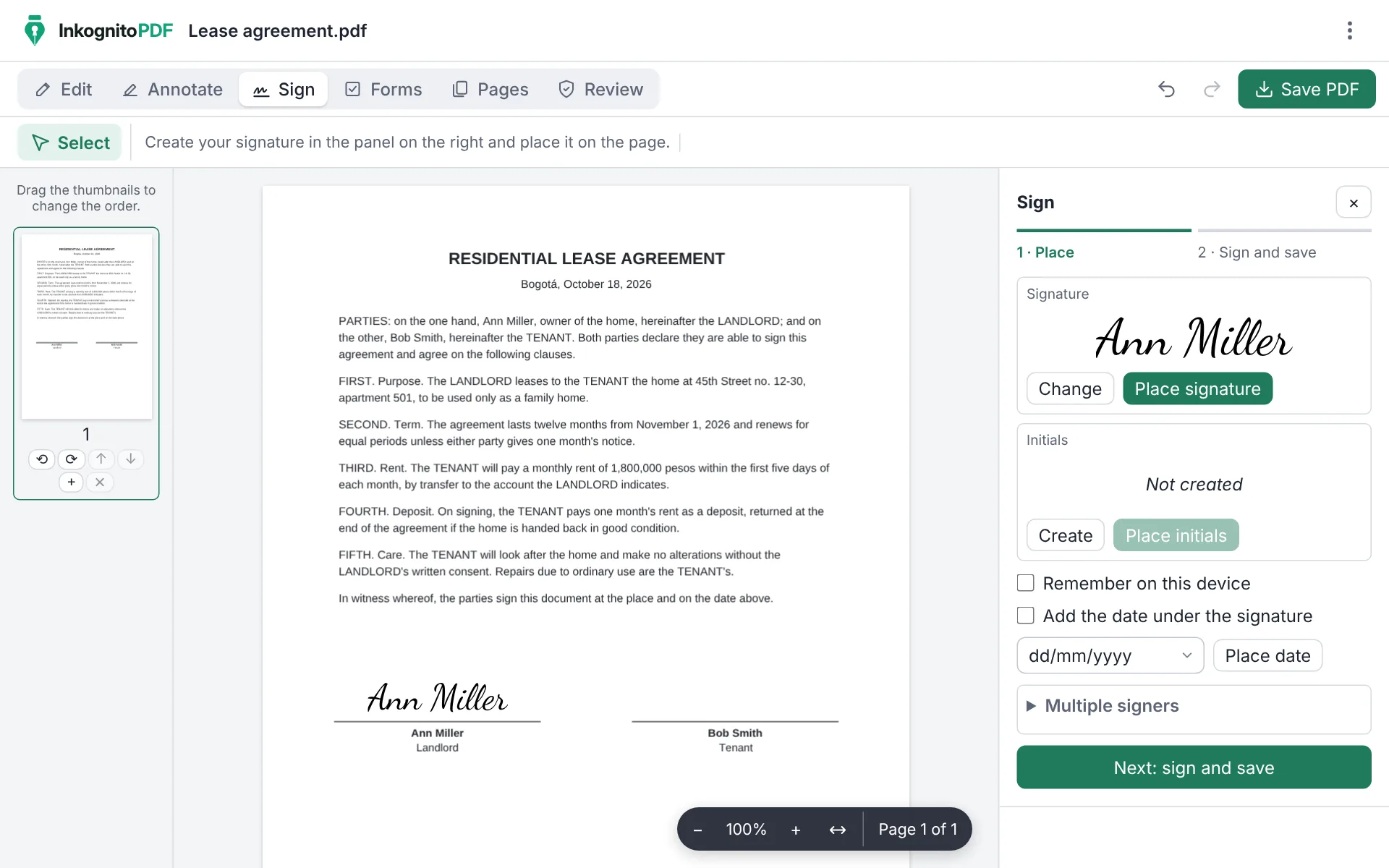
How to sign a PDF
- Tap “Sign a PDF now” and open the document from your phone or computer.
- Create your signature: draw it with your finger or mouse, type it in a handwriting font, or use an image of your signature.
- Place it on the signature line and resize it. You can also add your initials and the date.
- Choose the digital signature (PAdES), the recommended one, so anyone can check the PDF was not changed afterwards, and save it.
Full guide: several signers and digital signatures, step by step
Why do it with InkognitoPDF
Your document stays with you
Contracts, invoices and forms carry personal data. Here the PDF is signed in your browser and never goes through a server.
A signature anyone can verify
With a PAdES signature, Adobe Acrobat and other readers show who signed and warn if the document changed afterwards. Use your .p12 certificate or create one on the spot.
Several signers, in order
Prepare the document for several people to sign, one after another, with an audit page at the end.
Frequently asked questions
Can I sign a PDF on my phone?
Yes. Open the app in your phone's browser, open the PDF and draw your signature with your finger. You can also add it to your home screen.
Is the signature legally binding?
PAdES is a European standard that Adobe Acrobat and other readers verify. Whether it is legally binding depends on the certificate you use and the law where you are; official procedures often require a certificate issued by an authority.
Do I have to pay or sign up?
No. It is free, open source and asks for no account or email. It adds no watermarks either.
Other things you can do
- Scan a document Photos of paper to a clean black-and-white PDF.
- Edit the text of a PDF Change the text and keep its font, size and color.
- Merge PDF Combine several PDFs and put the pages in order.
- Compress a PDF Make it small enough for email or chat.
- Fill out a form Complete fields, checkboxes and lists, and sign.
- Redact personal data Really remove ID numbers, accounts and emails.
- Scanned PDF to text (OCR) Recognize the text so you can search and copy it.
- CamScanner alternative Scan with no watermark, no subscription and no cloud.
- Scan both sides of an ID card Front and back on one A4 page, at real size.
- iLovePDF alternative The everyday PDF tasks, without uploading files.